

Disclaimer: Use this DIY at your own risk. I will not be responsible for any problems this DIY may cause.
This DIY will guide you through the installation of a KP Technologies MX20 Controller Module to run the fog lights independent of the headlights on the 2[SUP]nd[/SUP] Generation (09 - 13) Infiniti FXs.
You will need a KP Technologies MX20 Controller Module (http://www.kptechnologies.com/products.php#/12) and your regular hand tools such as metric sockets set, wire cuter & stipper, electrical tape, soldering iron and hear shrink tube if you chose to use them to complete this DIY. It will take approximately 2 - 3 hours at leisure pace. You may need a round loop wire terminal if you chose to connect to the battery directly.
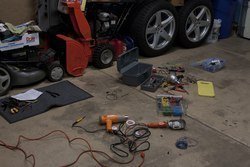
1. Tools you need. No, you don't the snow blower, lawn mower, or the spare tires.
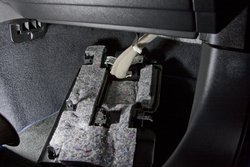
2. The BMC (Body Control Module) on the passenger side foot well.
Pull straight down on the panel under the glove compartment.
Pry and lift on the door sill plate.
Loosen the black plastic nut that hold one end of the foot well kick panel
Pull kick panel straight toward the driver side to remove it from the frame.
Disconnect the two connector from the panel to remove it from the car if you need more work space.
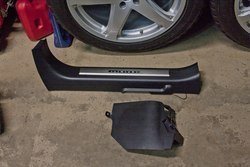
Door sill plate and kick panel.
BMC
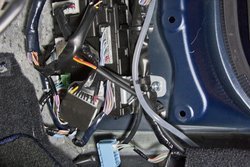
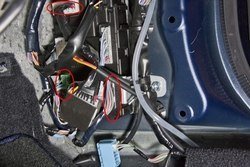
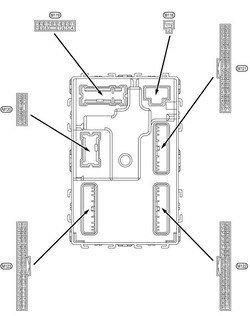
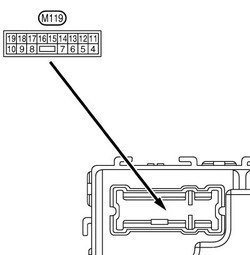
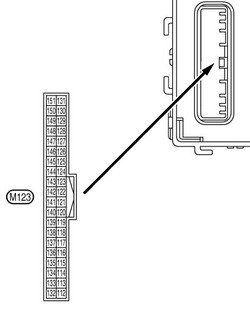
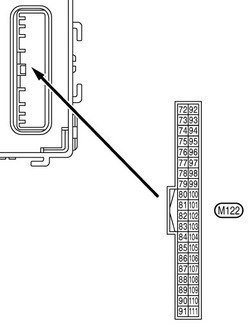
3. You need to make 4 connections onto the 3 highlighted BMC connectors.
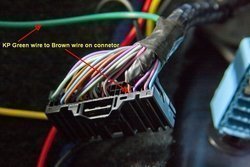
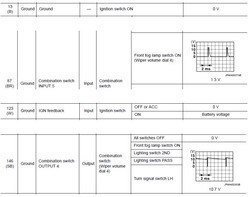
4. Connect the KP Green wire to the Brown wire (pin 87 on M122) on connector.
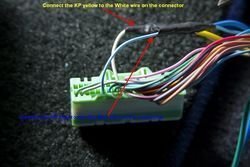
5. Connect KP Blue wire to Sky Blue wire (pin 146 on M123) on connector.
Connect KP Yellow wire to White wire (pin 123 on M123) on connector.
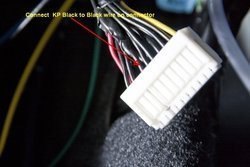
6. Connect KP Black wire to the third wire (pin 13 on M119) on connector.
7. Test your connections. Turn key to ON, turn on the fog light, and check the red LED on the KP module. If the LED lights up, you made good connections.
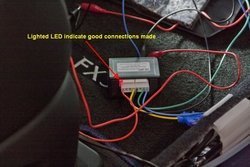
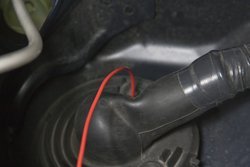
8. Feed the KP Orange wire through rubber boot to the engine bay. Use some silicone to seal around the wire and the boot to prevent any water seepage.
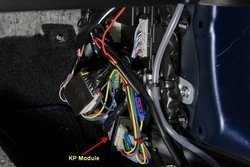
9. Zip ties the extra wires and stow the KP module.
10. Now that we have completed the wiring at the BMC, we being to work in the IPDM (Intelligent Power Distribution Module) in engine bay. Remove the battery compartment cover and crowl top cover to access the IPDM.
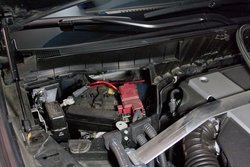
11. IPDM
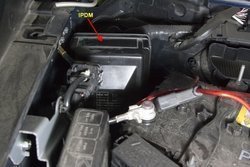
12. Note: Lay some rag over the batter terminals so that your IPDM cover won’t be all scratched up and to protect the wires from sharp edges on the battery terminals.
Remove the IPDM, reach behind the IPDM and squeeze the two tabs toward the front of the car and lift it from the bracket.
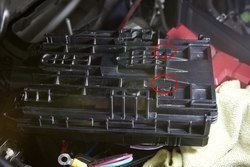
13. Remove the IPDM cover, use a small flat head screwdriver and lightly pry the tabs up while you pull the cover away from it.
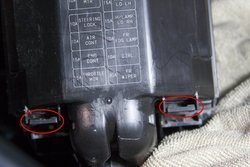
14. Remove the IPDM from it backing bracket, carefully work the wire bundle out of the guide tabs at the bottom of the backing bracket. Spread the two tabs on top of the backing bracket and then pull up to take the IPDM internal off the backing bracket.
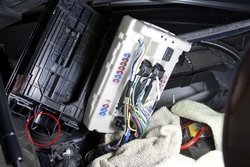
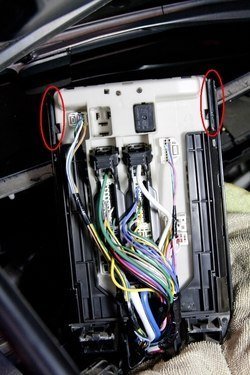
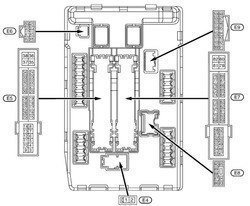
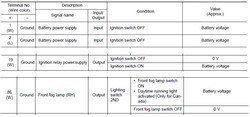
15. Connect the relay Red wire (terminal 86) to White wire (pin 19 on E5) on the IPDM.
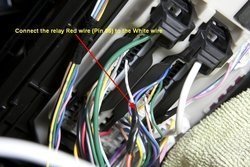
16. Pull the fuse out of the black fuse holder on the provided Yellow wire BEFORE making the connection.
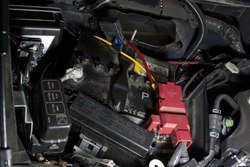
Connect the relay Green wire (terminal 87) to the provided Yellow fused wire and then connect the other end of the yellow wire directly to battery positive (+) terminal or to the thick blue wire (next to the thicker white wire, pin 2 on E4) on the IPDM. In this picture I chose to connect directly to the battery with a loop wire tab terminal.
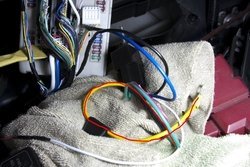
17. Cut the White fog light wire (pin 86 on E8).
Connect the relay Blue wire (terminal 87A) to the cut white wire end on the E8 connector side.
Connect the relay Black wire (terminal 30) to the other end of the cut white wire.
Connect the relay White wire (terminal 85) to the Orange color wire from the KP module.
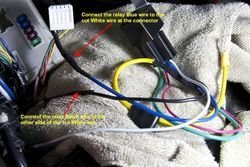
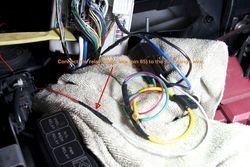
18. Connect the loop wire tab to the battery positive (+) terminal if you chose to power the relay from direct battery source.
Insert the fuse back into the black fuse holder and test your installation. Turn the key to ON and turn the fog lights via the OEM stalk.
19. Tada.
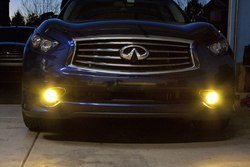
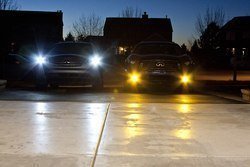
The Following are some FSM Diagrams for your reference:
BMC:
IPDM:
Enjoy.

This DIY will guide you through the installation of a KP Technologies MX20 Controller Module to run the fog lights independent of the headlights on the 2[SUP]nd[/SUP] Generation (09 - 13) Infiniti FXs.
You will need a KP Technologies MX20 Controller Module (http://www.kptechnologies.com/products.php#/12) and your regular hand tools such as metric sockets set, wire cuter & stipper, electrical tape, soldering iron and hear shrink tube if you chose to use them to complete this DIY. It will take approximately 2 - 3 hours at leisure pace. You may need a round loop wire terminal if you chose to connect to the battery directly.
1. Tools you need. No, you don't the snow blower, lawn mower, or the spare tires.
2. The BMC (Body Control Module) on the passenger side foot well.
Pull straight down on the panel under the glove compartment.
Pry and lift on the door sill plate.
Loosen the black plastic nut that hold one end of the foot well kick panel
Pull kick panel straight toward the driver side to remove it from the frame.
Disconnect the two connector from the panel to remove it from the car if you need more work space.
Door sill plate and kick panel.
BMC
3. You need to make 4 connections onto the 3 highlighted BMC connectors.
4. Connect the KP Green wire to the Brown wire (pin 87 on M122) on connector.
5. Connect KP Blue wire to Sky Blue wire (pin 146 on M123) on connector.
Connect KP Yellow wire to White wire (pin 123 on M123) on connector.
6. Connect KP Black wire to the third wire (pin 13 on M119) on connector.
7. Test your connections. Turn key to ON, turn on the fog light, and check the red LED on the KP module. If the LED lights up, you made good connections.
8. Feed the KP Orange wire through rubber boot to the engine bay. Use some silicone to seal around the wire and the boot to prevent any water seepage.
9. Zip ties the extra wires and stow the KP module.
10. Now that we have completed the wiring at the BMC, we being to work in the IPDM (Intelligent Power Distribution Module) in engine bay. Remove the battery compartment cover and crowl top cover to access the IPDM.
11. IPDM
12. Note: Lay some rag over the batter terminals so that your IPDM cover won’t be all scratched up and to protect the wires from sharp edges on the battery terminals.
Remove the IPDM, reach behind the IPDM and squeeze the two tabs toward the front of the car and lift it from the bracket.
13. Remove the IPDM cover, use a small flat head screwdriver and lightly pry the tabs up while you pull the cover away from it.
14. Remove the IPDM from it backing bracket, carefully work the wire bundle out of the guide tabs at the bottom of the backing bracket. Spread the two tabs on top of the backing bracket and then pull up to take the IPDM internal off the backing bracket.
15. Connect the relay Red wire (terminal 86) to White wire (pin 19 on E5) on the IPDM.
16. Pull the fuse out of the black fuse holder on the provided Yellow wire BEFORE making the connection.
Connect the relay Green wire (terminal 87) to the provided Yellow fused wire and then connect the other end of the yellow wire directly to battery positive (+) terminal or to the thick blue wire (next to the thicker white wire, pin 2 on E4) on the IPDM. In this picture I chose to connect directly to the battery with a loop wire tab terminal.
17. Cut the White fog light wire (pin 86 on E8).
Connect the relay Blue wire (terminal 87A) to the cut white wire end on the E8 connector side.
Connect the relay Black wire (terminal 30) to the other end of the cut white wire.
Connect the relay White wire (terminal 85) to the Orange color wire from the KP module.
18. Connect the loop wire tab to the battery positive (+) terminal if you chose to power the relay from direct battery source.
Insert the fuse back into the black fuse holder and test your installation. Turn the key to ON and turn the fog lights via the OEM stalk.
19. Tada.
The Following are some FSM Diagrams for your reference:
BMC:
IPDM:
Enjoy.
Last edited:


