Jumbo electronics

jumbosrule

Fully FX Invested
Premium
Location
Redondo Beach, CA
Car
2003 FX35T
Name
Brad
Back in 2004 when I bought the sport & touring package with NO technology, I didn't miss the GPS at all. At the time, GPS wasn't really mainstream yet - many of the units out there were glitchy and slow. I didn't have the option of adding the tech package anyway, so I got what I wanted.

But now I'm ready for an electronics upgrade. I been looking for the right aftermarket unit that integrates with the OEM system and expands into the new tech available since 04. That includes GPS, Bluetooth (hands free calling), USB/MP3 connectivity, etc. I don't plan to remove the factory gear, so I want the new unit to work with or in addition to the regular functioning OEM radio & CD. Most likely I'll end up plugging the new unit into the SAT inputs of the OEM unit, so all audio from the new unit just passes through the OEM unit to the speakers.

After doing my standard research I bought the Pioneer AVIC-F500BT for a really great price. I like that it is a removable unit because that makes it thin and it will be much easier to custom install into the dash. If the AVIC fits in front of the orange screen, I might try to hinge the new screen to flip up and expose the orange screen when I want to see it.
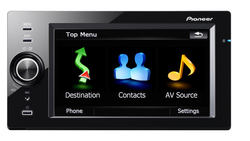
AVIC-F500BT_main_lrg.jpg

http://www.pioneerelectronics.com/P...eo/In-Dash/GPS-Navigation-Systems/AVIC-F500BT

A little custom dash work will probably be required to install the mount and hide wires, but this has all the entertainment tech I really want in the car. The AVIC has the capability of adding a rear camera as well as a microphone for voice command/control and bluetooth. Doesn't look too tough to wire up.
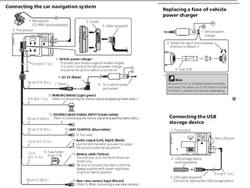
AVICconnections.jpg

This AVIC has connectivity to a computer for firmware upgrades and can also pull supported file types from storage media via USB.

I now have aftermarket engine management in the Haltech computer, which is now performing some engine management as well as the turbo systems control and monitoring of aftermarket engine sensors. That Haltech interfaces via USB to the tuner laptop.

I purchased the Uprev Osiris cable, which connects directly to the OBDII port and allows tuning of the OEM ECU. The Osiris cable is an OBDII to USB cable. It also connects to the tuner laptop.

I've got a trio of PLX gauges in my sights for monitoring. One of them is the PLX iMFD, which is a universal gauge that has selectable view gauge types or it can list four sensor numbers at once. It also connects to the OBDII port. The iMFD gauge can be used to read and clear engine codes or view any other parameter available through the OBDII interface.

http://www.plxdevices.com/multigauges.html

Started a thread about integrating the PLX gauge with a couple other permanent display gauges. Think I'll probably end up doing a custom dash mount for these as well - maybe where the center speaker is currently located. This is the post where I photoshopped (or actually power-pointed) what I want the gauge cluster to look like:

///164102&postcount=10

Since both the Uprev and the PLX cables use the OBDII connection and we only have one port in the car, I'll be needing a splitter so I can run them both at the same time. Found this one for $16:

http://www.carplugs.com/Product_view_Cables_2.html

I'd like to make ALL this gear easily accessible through one cable. One connection. I'm going to try connecting to a powered USB hub that will be connected with all the gear. PLX iMFD, Osiris, Haltech & AVIC would all show up on the USB connections as soon as the cable is plugged into a laptop.

http://www.targus.com/us/product_details.aspx?sku=PAUH217U

Finally, I got a Cell ranger as a gift. My particular model is a USB powered signal booster. Cool gadget. Once it is installed and wired up, I'll never think about it again. I'll just enjoy better 3G service in my car - which I could use because I have AT&T.

http://www.getcellranger.com/port

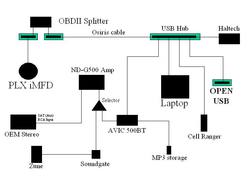
Here's my wiring diagram as it stands today:
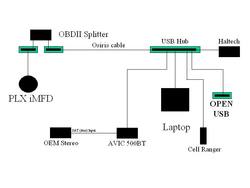
FXUSB-1.jpg

This setup allows me to throw in any additional USB supported device in the open USB ports. Music players (or a player dock), an external hard drive, memory stick, etc. I have unused ports on the hub, so I could run another wire to any place in the car for an easy connection to... whatever.

I'm pretty psyched up about wiring it up. If anybody has suggestions or additions - post them up!
 
Last edited:
I had (in box somewhere) the F500BT and it was a cool unit. My setup was really simple and ghetto since the audio wasn't loud enough. I used a 3.5mm PAC audio hookup, with turbo-1 line booster. Other than that, it kicked butt. Can't wait to see your setup, it looks more professional than the way I had mine.
 
I added the Epicenter, JL amp & sub and removed the Bose sub last year and I'm totally happy with the volume of the system as a whole. The F500BT connects using that 3.5mm PAC cable - I was planning to wire a 3.5mm - RCA cable from the F500BT to the SAT input of the OEM unit. Think I need a booster like you had?

Tell me about your F500BT - did you like it? Was the navigation decent? Did you use the unit for multiple sources or just an iPod? Did you use it to replace the OEM stereo or with it?
 
Last edited:
I used mine as basic as you can get. I did use the PAC AAI-NIS2 to connect the F500BT with RCA cables. I didn't have an aftermarket sub, only OEM, and the sound was too low. I don't think you'll need the Turbo-1 if your sound is already fine, but you'll lose a little bass using it. I only used the F500BT for video playback through USB stick (kinda laggy), didn't use the SD, iPhone for music, and kept use of the OEM radio. All audio from the SAT button. Navigation was nice/beautiful, but the touchscreen was laggy compared to the Magellan I have now. I got lost in downtown Dallas with the unit though... but everywhere else, it took me to my location. The voice commands for the bluetooth dial/iPod was hit/miss. It worked half the time, lol.
 
Got my Pioneer AVIC in the mail yesterday. Charged it up and started playing with it. I'm pretty impressed so far. There are really only three major features on this unit. Using the phone, using navigation or using SD/USB media connections.

As soon as you pair it with your phone, it connects automatically when the AVIC is powered on and in range. You can disable this feature, but I was playing with it and I really liked how well it works. It pulls in your phone's contact list, recent calls can be viewed and scrolled through... pretty cool features that are easier to navigate than they are on my phone.

The navigation is pretty standard. Using the auxiliary inputs gives you the option of using a SD card or a USB connection (including iPod) which means the screen can play recorded video. The output of the AVIC goes to the SAT/AUX input on the head unit, so the two units work together - there is no duplication of control and all the OEM controls still work. Looking forward to installing it and trying out the features in the car.

Got the OBDII splitter in the mail today, so I now have everything except for the PLX gauges and laptop.

I have continued my research into improving the Bose system. I'm all about improving what I have rather than gutting the system and spending 10 times as much. So far it seems to me that improvements can definitely be made without removing much of the stock equipment. Specifically, adding in equalization for the ability to tweak each channel in addition to cleaning up the line level signals and boosting to perfect input voltages before they hit the Bose amp.

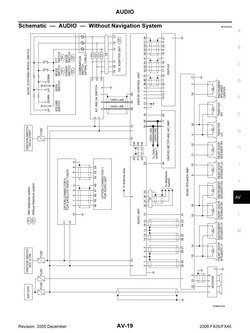
Pulled the wiring diagrams from the manual. Looks like there are four channels wired into the Bose, plus the sub. My sub is gone, but I'm still pulling the signal from the Bose amp. FL, FR, RL, RR, SW each have a discreet signal coming from the Bose amp.

Audiowiring_Page_2.jpg

I have to assume the Bose amp has built in cross-overs (sending the right highs and lows to the correct speakers). I also know Bose components are not the highest quality, but the power is well matched to the components so I need to take advantage of the Bose electronics by giving the Bose amp the best pre-amp signal I can manage.

I have already added Audiocontrol's Epicenter bass processor along with a JL amp & sub. This processor restores and cleans up the low frequency spectrum and with the JL amp gives me the ability throw as much power into the bass as it takes to get a perfect balance according to my ear. The gain on the amplifier is at about 40% right now - more than enough. The Epicenter control knob allows me to adjust bass output up or down on the fly and I use it quite a bit. Most of the time I adjust it during the first song on an album and then the levels are usually good for the whole album. But if I want more thump I can adjust while driving.

So about the best I can do without dropping big cash on the high frequency range is a signal processor and EQ with line drivers. This will allow me to maximize the Bose system performance by giving me the ability to fine tune it. I can go with Audiocontrol's EQL (two of them, two channels each).

http://www.audiocontrol.com/t34/524...s/EQL-Trunk-Mount-Equalizer-and-Pre--amp.html

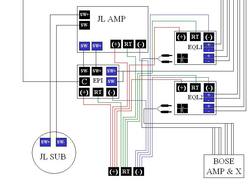
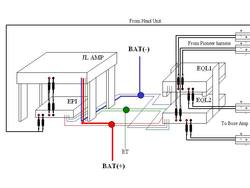
This sketch also shows the Epicenter and JL amp/sup. Looks like I'm going to need to work out a power/ground/remote trigger distribution.I'm thinking it will work like this:

FXAudio.jpg


I've just been doing a lot of reading and I'm impressed with Audiocontrol's technologies and products. I've had a phone conversation with them and we are going to identify the input Bose signals and see if the EQLs will add any benefit.

If anybody has ideas or suggestions, I'm happy to listen. Just keep in mind that my goals are to leave the system in place and improve it. Just like modding the FX for performance you get the best value by taking full advantage of the parts you have - pushing them beyond their intended limits by using smart aftermarket modifications.

I don't want to replace all the speakers right now - maybe in the future. At that time I'll go for aftermarket amps as well. All the gear I have outlined in this thread should be forward compatible. Aftermarket signal processing will allow me to improve the OEM quality and still have a full aftermarket sound system in the future without wasting money now.
 
Last edited:
Updated the USB & AVIC set-up. Recently bought the AVIC external amplifier, Soundgate for the Zune, and a 128GB stick drive that will hold every song I own. The Zune and the USB cable for music will be wired to the center armrest console. The AVIC, the amp and the Soundgate will have dedicated power.

FXUSB.jpg

Haven't found a Selector for 3.5mm stereo jack connections yet. Wonder if a simple Y-adapter would work? It would be possible to play two sources over each other in that case but no big deal. Not sure if those 3.5 headphone splitters would work that way?
 
You mean something like this? http://electronicsusa.com/mk1and2.html. I have not use them before, so not sure of the quality or if there any signal lost going through it.
I'm pretty sure a simple 3.5mm stereo y splitter should. Like you have pointed out, it will play two sources at the same time if though.
 
You mean something like this? http://electronicsusa.com/mk1and2.html. I have not use them before, so not sure of the quality or if there any signal lost going through it.
I'm pretty sure a simple 3.5mm stereo y splitter should. Like you have pointed out, it will play two sources at the same time if though.

That is the selector, yes. I will be plugging the output directly into the amplifier, so a little signal loss is probably ok at the selector. Only problem with this is having to place it someplace I can flip the switch - or at least remove the switch from the device and wire it to a place easier to reach.

I was wondering if this would work:

http://www.bestofferbuy.com/35mm-ma...&utm_medium=affiliate&utm_campaign=affiliate1

Like I said - this will plug into an amplifer before going to the AUX/SAT input on my Head unit.
 
Last edited:
True - that would work! And I already have that cable.

I'm not sure what kind of wire the amplifier outputs to the head unit. It takes 3.5 in, so I would think 3.5 out also?

I can't tell from looking at the photo.

http://www.pioneerelectronics.com/PUSA/Products/CarAudioVideo/Accessories/AV-Components/ND-G500

These are "replacement parts" for the amplifier. Not sure if it comes with these. I hope it does because I need the first two part numbers!

View attachment 213605 CDP1133 POWER/SPEAKER CORD ASSY
View attachment 213605 CDP1140 5-PIN POWER CORD ASSY
View attachment 213605 CEK1136 FUSE 10A
View attachment 213605 CNM3728 MAGIC FASTENER (CATCH)
View attachment 213605 CNM3729 MAGIC FASTENER "LOOP"
View attachment 213605 CRD4344 OWNERS MANUAL ND-G500
View attachment 213605 CRT4156 S/M ND-G500
View attachment 213605 CWN3555 AMP UNIT
View attachment 213605 PAL007C OUTPUT IC (MOS)

Probably need to wait until the amp shows up so I can see what is in the box with it.

 
Last edited:
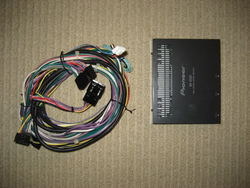
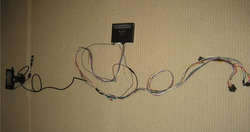
Well good news - the amp came with the two wiring harnesses I need. There are several connections between the harness that came with the AVIC and the harness that came with the Amp. This afternoon I pre-wired up the harness and zip tied it all together. Based on the natural length of the harnesses, I'll be installing the amp under the center armrest or under the passenger seat. Then the amp harness is long enough to reach an OEM connector in the trunk.

IMG_2781.jpg

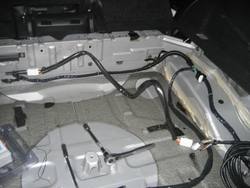
I pulled this next photo from the org. This is not my trunk, it's a photo from a aux/PAC install that hooks in to the OEM harness in the trunk. Exact same concept here. The Pioneer amp harness (black connectors in the center of the coil above) hook into the same white connectors you see in the photo below.

IMG_4094.jpg

Here's the whole thing wired up and almost ready for install.

IMG_2782.jpg

Now that I have all the wires in front of me along with the manuals, it looks like the Pioneer harness connects directly to the speaker lines between the head unit and the Bose amp. I don't have to use the SAT/Aux input on the head unit, which means I can use it for a Soungate/Zune adapter instead. Bonus.

At the center/bottom of the photo above, there are three cables that I have coiled and tied up - not being used at this time. If I ever decide to add a rear camera, there are only three connections I need to make after wiring up the camera. Future mod.

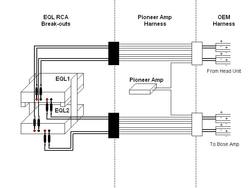
I revised the wiring diagram since the addition of the amp sort of changes where the signals are coming from. Now, I can just tap the Pioneer harness - four pairs of speaker signals wired directly to RCA plugs. All the sound from either the head unit or the AVIC will have to pass through the EQLs before getting to the Bose Amp.

EQLsignalwiring.jpg

With all this extra gear, I'm going to need a new rack in the trunk. Right now it is set up to display the JL amp and sub. The Epicenter is hidden under the JL amp. With the two EQLs back there as well, things are going to move around. I'm thinking there's no issue with the Pioneer since it should be in the console or under a seat. So now I'm building a rack to hold all the gear. Until I can remove all the gear from the FX, I can only go so far. What I can do is design the rack to be removable, with gear attached. The RCA break-outs will all be butt-splice connectors. Power, ground and remote trigger will all be wired to distribution blocks. All I need is one ring terminal for each wire.

Rackconfig.jpg
 
Last edited:
Update! Got pretty much all the gear delivered.

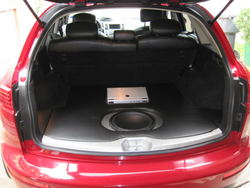
Here's the current trunk:

IMG_0806.jpg


I've sketched out a rack based on a few things I already have installed in the trunk well. I was being nerdy and I used orthographic views to help me figure out proportions.

1


I'm making this rack to replace the current one, which holds the Epicenter and JL amp. There is a custom enclosure for the sub as well and I don't plan on modifying the trunk floor any further at this point. This new rack holds the Epicenter and JL on the left and the two EQLs on the right, which will be perfect for mating to the harness going to the Bose amp.


FXAudiorackiso.jpg

For the most part I am making this rack out of scrap wood I have laying around. I keep a decent stock of wire too, so I should be able to DIY the rack for almost no cash.
 
So is that rack going to sit on or in your current floor?

It won't look any different than you see in the photo - the new rack goes under the floor, holding the existing gear in the same place it is now and adding space for two new components (the EQLs).

The current rack and sub enclosure are sitting on the floor - directly on top of the Dynamat I installed a few weeks ago. This new rack might require trimming the plastic floor frame or the addition of some fans to move air over the gear under the floor.
 
Last edited:
I stopped by the shop this afternoon to check on the FI build progress.

While I was there I pulled the JL amp and Epicenter out of the trunk so I could bring them home and integrate them into the rack. I now have all the components except for 1 of the EQLs, which should be here any day now.

Now that I have all the gear, I can see my rack sketch is a little off. The JL amp will sit pretty much centered on top of the rack.

In the my garage I've got the base completed with all the wiring. Next come the risers and the second level. I'll try to post up some photos this weekend.
 
Last edited:
Back
Top