Steering Wheel Radio Control Electrical Wiring Help

kartracertj

Member
Location
Decatur, Al
Name
Tim
Searched but couldn't find what I was after. I just put a new android 4.4 aftermarket double din in my 03 fx45. I have everything wired up and working except the steering wheel controls. I don't need an adapter because my unit is set up to run them. What wires go to the steering wheel control?
 
You need to find a manual from any steering wheel adapter, like Metra. They do list the wire colors in the installation manual.
 
Thanks for the responses. I have it wired with metra harness but my head unit has a extra set of wires for steering wheel controls. There is two wires for power and one ground and the unit says it may only need one power and one ground then I go in to the unit and assign the controls function. I will look into the harness from metra, and see if I can get what I need. I will let you guys know when I figure it out so maybe it will help someone else along the way. I had this car 3 hours before I bullet the dash apart and started cutting. I had a new android 4.4 double din laying around and figured I could stuff it in there. A ton of cutting, a little heat to persuade the ac ducts, and about 4 custom brackets later I had it fitting just right.
 
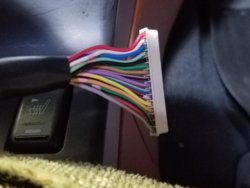
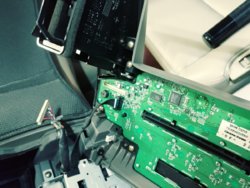
I have it all figured out for anyone who might need to know. My head unit had provisions for directly wiring in the steering wheel controls. The wires you need are in the long flat 16 pin connector that connects to the circuit board with all your dash controls. To find this you simply remove the plastic piece with all the ac and radio controls and it is one of two connections on the back. Once you find the 16 pin connector you can see one side says 1 and the other side says 16, these are tiny and hard to spot but will tell you which side of the connector to start your count from. You will be working with pin 12, 13, and 14. The wires may be a different color for different years but all 03-08 with this connector use 12,13,14 for the controls. Pin 12 should be a yellow wire, 13 an orange wire and 14 is green with a red stripe. 14 is a ground and your unit may or may not need it connected. Pin 12 and 13 operate the volume, mode, and forward/reverse functions located on the left side of the steering wheel. If you want to know if you have the right wires just take your multimeter and set it to ohms. Now take one lead and put it on pin 12 and the other on pin 14 and you should have an ohm reading around 8. Now push the volume button on the steering wheel and the ohms should jump around. Do the same for pin 13 with the other lead still on pin 14 and move the forward/ reverse button and you should see a jump in ohms. Now from here I just tapped into and soldered a lead wire off of pin 12, and another off of pin 13. I then wired pin 12 lead wire to one steering wheel control wire labeled key 1 on my head unit. Pin 13 lead wire goes to key 2 on the head unit and then I went into the units steering button control setup and set up the function of each button. It now works flawlessly with no delay. The unit I wired these to is the android 4.4 6.95" display unit purchased from eBay seller pumpkin cool. There shipping was fast and the customer service has been great but about a one day delay in response due to the international time difference. I love the unit and if you would like any more info please feel free to contact me. If this post would be more helpful edited or moved to another location, mods please feel free to do as you please with it. Thanks for the help, I just purchased an 03 fx45 with 80k on the clock and this forum made me feel confident enough to chop the dash all up, move the orange screen, and install a double din three hours after I got home with it. I hope this post helps just one person down the line.
 
Not real sure of the model number. I think it is made by klyd or klyde and is sold by autopumpkin on their site, amazon and ebay. It is called Pure android 4.4 kitkat with 6.95" display. You can find it on YouTube or google it. It is dual core but they just came out with a quad core. The dual core I have is pretty fast and I would highly recommend it for the price. I found mine for $350 and it blows my alpine unit away. I also have a two year old pioneer in my f250 and it is far superior to it also.
 
Kartracertj, I know your post is almost 2 yrs old but I was wondering if you still remember which connector at the back of the stereo assembly is the one that has the wires for steering wheel control. I have 05 FX35 and theres a few connectors at the back of my stereo. Is it the one that connects to the screen at the upper most? You also mentioned Pins 12, 13 and 14, so which pin that controls the volume and which pin controls the forward and reverse? I just installed an Alpine aftermarket stereo and bought me an Axxess ASWC-1 steering wheel control adapter. I have identified the wires that runs the power and ground but could not find the connector and color of the wires that I can connect the wires from ASWC-1 that controls the volume, forward and reverse and mode from the steering wheel. Also, how do I know which pins is 12, 13 and 14 from the 16 Pin connector? In other words, what is the connector orientation when reading the pins? Any picture of the connector?

Thanks in advance for your help.
 
Last edited:
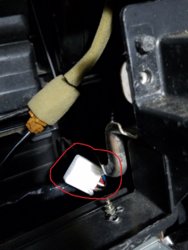
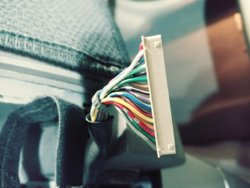
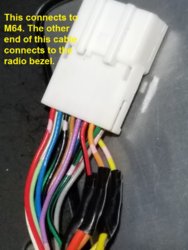
It is the one that connects to the radio bezel/panel. You can tab into the wire at the inner end in the dash or the outer end connects to the radio bezel.
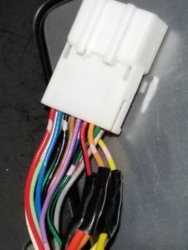
20161227_202737_1.jpg 20161230_103500.jpg 20161227_181927.jpg
 
Last edited:
I don't see it in your picture. The three wires are in the the 16-pin (my third picture) connector that plugs into the radio bezel. Trace the cable into the dash. It is attached to a metal bracket at the lower right/passenger side of the radio hole. Picture #2 is the other end of the 16-pin radio bezel cable. I choose to make the connection on the other end of that cable for neatness so I don't have extra wire hanging off that radio bezel connector. You can clearly see the Red-Black, Orange, & Yellow in the 16-pin (pic #3).
 
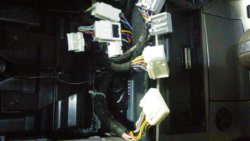
20170123_204658_HDR_Film3.jpg 20170123_204443_HDR_Film3.jpg The third picture that you shown is the same as the picture I have here that connect to the bezel that can be seen as soon as you open the face plate. Its above the black wire ribbon connector and these 2 connector are attached to the female connector on the circuit board. Is this it? If this is the right connector so, which 3 colors of the Axxess ASWC-1 that goes to red/black, yellow and orange of these wires? I read some post somewhere that I need the white/ green wire and gray/red wire of the ASWC-1 besides the red and black for the power. Can you guys confirm the colors? Kartracertj mentioned 12, 13, 14 which is the yellow, orange and red(ground) respectively. While la_fx35 mentioned 11, 12, 13 which is red/black, yellow and orange. So which is correct?
 
Last edited:
I am also curious about this. I just bought a 2005 FX35 AWD Sport and not only do I not like the orange screen, but I also don't use cd's or tapes.
I am comfortable with electrical wiring and modifying the dash to move the screen but I have a few questions.
Will the color screen from an 06 plug right in? How about the entire heater control stack to update it while I am modifying?

And the second question which I think pertains to kartracertj's post about using an android screen. Since I don't need cd functions what is involved in this setup and using steering wheel controls? I mostly use bluetooth linked to my cell for pandora, radio, and navigation.

If not, will the spot where the factory orange screen is hold a double din nav radio?
 
Alright, let straighten this out......

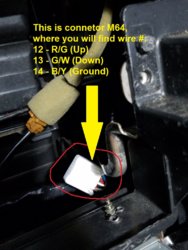
@GL, kartracertj's wire# 12, 13, & 14 is correct. Their color are #12 - R/G (Up), #13 - G/W (Down), & #14 - B/Y (Ground). Theses wires are from the connector (M64) in the picture below. You're looking at the wrong connector. You're looking at the connector on the cable that's connects to connector M64 bury in the dash. I never mention wire# in my post above where I made my connections. I only show picture with wire color where I make the connection which in turn mate into wire # 12, 13 & 14.
20161227_202737_1.jpg 20161230_103500_1.jpg

Since you wanted to connect the Axxess ASWC-1 to the cable that links connector M64 to the radio bezel, you would connect the Orange wire on this cable, to ground on the Axxess ASWC-1. Connects Red/Black wire to the Axxess ASWC-1 wire that provides "up" functionality. Connects the Yellow wire to the Axxess ASWC-1 that provdies "down" functionality. Since I don't need to use the the Axxess ASWC-1, I can't tell you specifics onthe ASWC-1 wiring. My headunit has built-in steering wheel control, all I need is connect the Up & Down wire from the headunit to car.
 
la_fx35, Thank you very much and I will try again to reconnect my Axxes ASWC-1 this weekend. The last time I tried there was some weird thing happening and I was scared the hell that I thought I toast the wirings. I am not that good on electrical that's why I always ask for some help. I will update you guys next week.
 
So i have the Axxes ASWC-1, i believe i have it all hooked up correctly. black wire to chassis, red wire to amp turn on from head unit, gray/red wire to pin 12, white/green wire to pin 13, and i spliced into pin 14's wire and grounded that. steering wheel controls work just fine with out the 16 pin plugged into the stereo bezel, once i plug the 16 pin in everything stops working, unplug it and it starts working again. anybody have an idea on why this is happening? if i didn't need my A/C controls id just leave the 16 pin unplugged lol
 
So i have the Axxes ASWC-1, i believe i have it all hooked up correctly. black wire to chassis, red wire to amp turn on from head unit, gray/red wire to pin 12, white/green wire to pin 13, and i spliced into pin 14's wire and grounded that. steering wheel controls work just fine with out the 16 pin plugged into the stereo bezel, once i plug the 16 pin in everything stops working, unplug it and it starts working again. anybody have an idea on why this is happening? if i didn't need my A/C controls id just leave the 16 pin unplugged lol
Did you find the problem
 
Back
Top